Undo send in Gmail beyond 30 seconds.

Soft Send holds supported Gmail messages, including replies, for 1 minute to 1 hour, giving you time to reopen, edit, cancel, pause, or catch a mistake before delivery.

14 days of Pro free, then keep Free or upgrade for $14.99 once. No subscription.
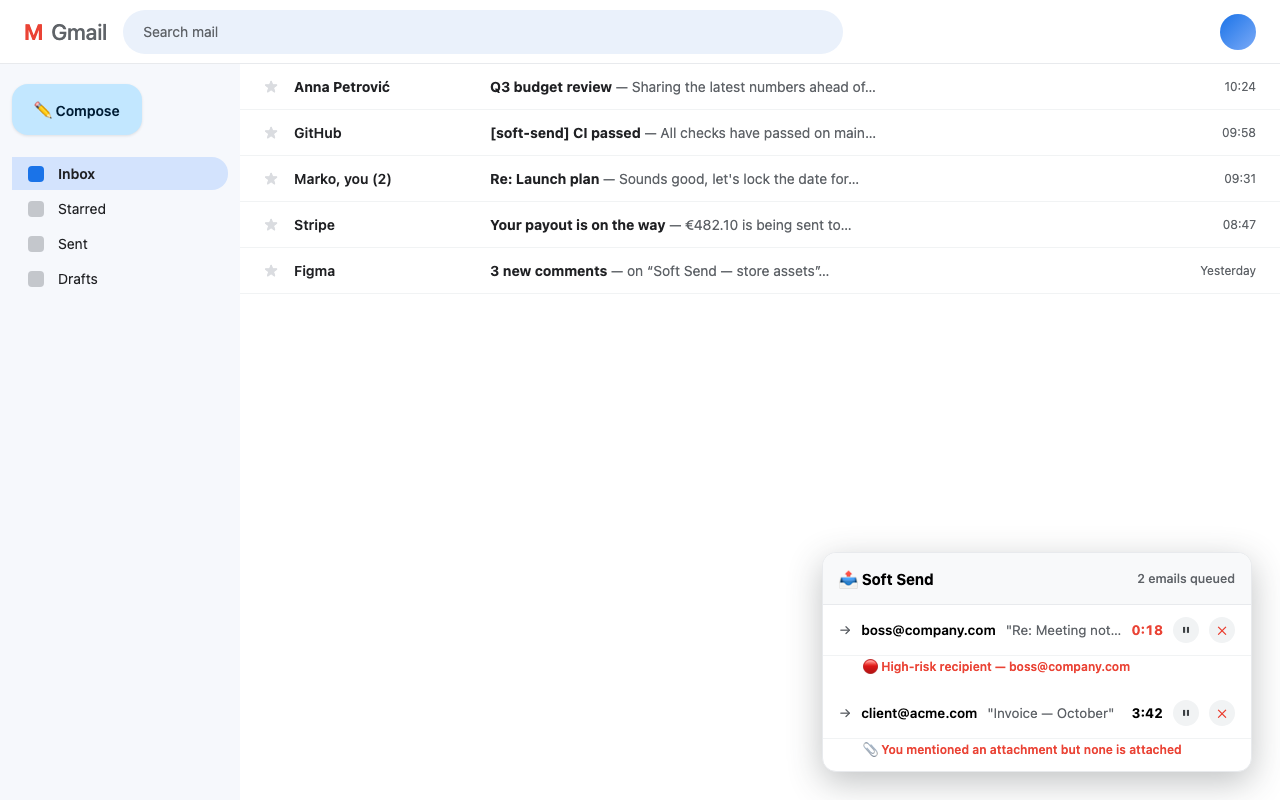
Soft Send queue banner inside Gmail showing two queued emails with countdowns and risk warnings

What it does

Delay & undo

Free includes a 1-minute delay, return to editing, Cancel, and Send now. Pro adds longer and custom delays plus Pause and Resume.

Risk detection

Free warns you before delivering when the message mentions an attachment but none is attached, so you can undo send before it reaches the recipient. Pro adds warnings for new recipients, fast typing, and sensitive content.

High-risk lists (Pro)

Flag specific people or whole domains, such as your CEO or a client's company, so the wrong message never reaches the wrong inbox.

Private by design

No Soft Send server, no relay, no tracking. API-delivered message content stays local until it goes to Google's Gmail API. Native message content remains in Gmail.

Native to Gmail

A clean queue banner lives right inside Gmail, with live countdowns, pause and cancel on every message.

Edit before delivery

Click a queued email to reopen it in Gmail. Make your changes and Send again to start a fresh delay.

A longer Gmail send delay, without changing how you send

Gmail Undo Send is a short cancellation delay

Gmail lets you choose a cancellation period of 5, 10, 20, or 30 seconds. After you press Send, you must click Undo before that period expires. Google documents those limits in its official Gmail Help instructions.

Soft Send holds supported messages for longer

Soft Send is a Chrome extension for people who want an automatic Gmail send delay measured in minutes. Send normally, then use the local queue to reopen and edit, cancel, pause, or release the message immediately. New messages without attachments can be delivered through the Gmail API. Replies, forwards, and messages with attachments stay in their original Gmail composer until Gmail performs the final send.

Gmail undo send, with enough time to use it

Can you undo send in Gmail after 30 seconds?

Gmail's built-in cancellation window is limited to 30 seconds. Soft Send delays supported messages, including replies, giving you a configurable window of 1 minute to 1 hour to reopen, edit, cancel, pause, or send now. It cannot recall a message that was already delivered.

How do I increase Gmail’s undo send time?

Install Soft Send, choose your default delay, and send normally. Every protected message appears in a local queue with a live countdown and controls to pause, cancel, or send immediately.

Does Soft Send upload or store my emails?

No Soft Send server stores your email content. Risk checks run locally in your browser. New messages without attachments can be sent through Google's Gmail API, while replies, forwards, and attachments remain in Gmail for native delivery.

Can I unsend a Gmail message after 1 minute or 1 hour?

Not if Gmail already delivered it. Soft Send must be installed before the mistake and configured to hold supported messages. A one-minute to one-hour delay keeps future messages cancellable during that chosen window.

Can I delay every outgoing email in Gmail?

Soft Send can automatically delay supported messages sent from Gmail in desktop Chrome. Replies, forwards, and messages with attachments remain in the original Gmail composer while queued. Keep that Gmail tab and draft open. If the composer is unavailable at delivery time, Soft Send pauses the item instead of sending an incomplete message.

What if I sent a Gmail without the attachment attached?

Soft Send detects when your message text mentions a file but Gmail has no attachment chip. It warns you before the message is delivered, so you can undo send: cancel the queued message, add the file, and send again. Without a pre-delivery delay, a Gmail message with a missing attachment cannot be unsent after the built-in 30-second window ends.

Practical Gmail sending guides

Undo send after 30 seconds

What is and is not possible after Gmail's built-in window ends.

Read guide →

How to undo send in Gmail

Use Gmail's Undo button and configure the longest built-in cancellation period.

Read guide →

How to delay send

Compare scheduled delivery with an automatic pre-delivery safety delay.

Read guide →

Can you recall a Gmail email?

The honest answer, plus what to do when a message was already delivered.

Read guide →

Gmail Outbox explained

Understand queued, scheduled, delayed, and stuck messages.

Read guide →

Prevent Gmail mistakes

A fast checklist for recipients, reply-all, files, tone, and sensitive content.

Read guide →

Gmail send delay extension

See when an automatic safety delay is more useful than Schedule send.

Read guide →

Try Pro free. Upgrade once.

$14.99 once

14-day Pro trial with no payment details required

  • Longer and custom delays
  • Unlimited queued emails
  • Pause and resume controls
  • Advanced risk checks and high-risk lists
  • One payment, no subscription
Add to Chrome for free

Free remains available after the trial with a 1-minute delay, one queued email, Cancel, Send now, and missing-attachment warning. Terms and refunds